
Tampilkan postingan dengan label IT - SQL Server - Concept. Tampilkan semua postingan
Tampilkan postingan dengan label IT - SQL Server - Concept. Tampilkan semua postingan
11 Desember 2012


25 Juli 2012
How To Avoid It In Logical Fragmentation SQL Server
Given that the primary contributor to logical fragmentation is page splitting,
the key to avoiding logical fragmentation
is to do everything possible to avoid page-splitting.
This can be done in a couple of different ways:
(1).
Choose index keys that are either ever-increasing values or ever-decreasing values.
In this type of index setup,
newly inserted records
will always be placed at either the beginning or end of the logical page-chain,
and hence lead to very few (if any) page-splitting as a result of insert operations.
You would still see page splitting at the root/intermediate level of the index,
but rarely (if ever) at the leaf level of the index.
If you are using GUID values for index keys,
with SQL Server 2005,
consider using the new function "newsequentialid()"
to generate ever-increasing GUID values
instead of random location values.
the key to avoiding logical fragmentation
is to do everything possible to avoid page-splitting.
This can be done in a couple of different ways:
(1).
Choose index keys that are either ever-increasing values or ever-decreasing values.
In this type of index setup,
newly inserted records
will always be placed at either the beginning or end of the logical page-chain,
and hence lead to very few (if any) page-splitting as a result of insert operations.
You would still see page splitting at the root/intermediate level of the index,
but rarely (if ever) at the leaf level of the index.
If you are using GUID values for index keys,
with SQL Server 2005,
consider using the new function "newsequentialid()"
to generate ever-increasing GUID values
instead of random location values.
What Causes in File-Level Fragmentation SQL Server ?
(1).
Other applications/services/etc. (or SQL Server itself)
writing data to the same spindles
that SQL Server data/log files reside on
- this can lead to fragmentation on the file system
because as the SQL Server files grow,
they end up being allocated space on the spindle(s)
that is not physically contiguous to prior allocations for the same file,
since data for these other applications/services/etc. have been allocated
that space for storing whatever data it may be
(could be a word document,
could be a backup file (sql server or otherwise),
could a another sql server data file,
could be a text document, etc., etc.).
Notice that it doesn't have to be a non-sql server file
that can cause file-level fragmentation

Other applications/services/etc. (or SQL Server itself)
writing data to the same spindles
that SQL Server data/log files reside on
- this can lead to fragmentation on the file system
because as the SQL Server files grow,
they end up being allocated space on the spindle(s)
that is not physically contiguous to prior allocations for the same file,
since data for these other applications/services/etc. have been allocated
that space for storing whatever data it may be
(could be a word document,
could be a backup file (sql server or otherwise),
could a another sql server data file,
could be a text document, etc., etc.).
Notice that it doesn't have to be a non-sql server file
that can cause file-level fragmentation
What Can Cause a Page Split in Logical Fragmentation SQL Server ?
Logical fragmentation primarily results from page splitting, or page splits.
Aside from page splits,
logical fragmentation can also be introduced by deleting data
(resulting in free space within a page, dropping the page density).
What can cause a page split ?
A page split is what occurs to a database page
when new data of some kind needs to fit a page,
but there is not enough room on the page
to acommodate all the data needed to be placed in the page.
Page splits do NOT occur on a heap,
only on indexes (clustered or non-clustered).
What a page split is involves a complicated discussion,
because it is a fairly complicated operation
- for the sake of ease of description,
think of it as a single page being split in half,
with 1/2 of the rows on the page moving to a newly allocated page,
and the other 1/2 of the rows remaining where they are.

Aside from page splits,
logical fragmentation can also be introduced by deleting data
(resulting in free space within a page, dropping the page density).
What can cause a page split ?
A page split is what occurs to a database page
when new data of some kind needs to fit a page,
but there is not enough room on the page
to acommodate all the data needed to be placed in the page.
Page splits do NOT occur on a heap,
only on indexes (clustered or non-clustered).
What a page split is involves a complicated discussion,
because it is a fairly complicated operation
- for the sake of ease of description,
think of it as a single page being split in half,
with 1/2 of the rows on the page moving to a newly allocated page,
and the other 1/2 of the rows remaining where they are.
Type of SQL Server Fragmentation - File-Level Fragmentation
File-level fragmentation - this is your typical fragmentation of data blocks
as they reside physically on-disk.
SQL Server has limited control over this type of fragmentation
- much of it is controlled by the disk subsystem
and our decision on where to place files,
how many to have, our choice of storage, etc.
All SQL Server can do really is request space for the given data file(s)
when it is told to do so, or when it needs to -
these requests are then passed to the appropriate APIs, storage drivers, etc.
which handle the allocation of new space on-disk.
The best SQL can do is request this space be contiguous,
but it will only at best get a full contiguous block in the size requested,
and this assumes you are using a single spindle with a single file.
Once you start introducing things like RAID, SANs, etc.,
you are now treading into a territory
where it is nearly completely out of SQL Server's control.

as they reside physically on-disk.
SQL Server has limited control over this type of fragmentation
- much of it is controlled by the disk subsystem
and our decision on where to place files,
how many to have, our choice of storage, etc.
All SQL Server can do really is request space for the given data file(s)
when it is told to do so, or when it needs to -
these requests are then passed to the appropriate APIs, storage drivers, etc.
which handle the allocation of new space on-disk.
The best SQL can do is request this space be contiguous,
but it will only at best get a full contiguous block in the size requested,
and this assumes you are using a single spindle with a single file.
Once you start introducing things like RAID, SANs, etc.,
you are now treading into a territory
where it is nearly completely out of SQL Server's control.
24 Juli 2012
Type of SQL Server Fragmentation - Logical Fragmentation
We're going to use this terminology for what is arguably the most common type of fragmentation
- leaf pages of indexes becoming physically unordered within a given file
so as to no longer match the logical left-to-right linked-list ordering of the pages.
This type of fragmentation as we'll use it here
* relates in no way whatsoever to the physical pages being contiguous
(i.e. back to back, side by side, etc.) within the given file,
but only to the physical order of the pages within the file
compared to the logical order in the linked list;
* the difference between contiguous pages and properly ordered pages
would be that to be contiguous,
the pages must exist physically in side-by-side positions within the file
(i.e. pages 1,2,3,4,5,6,...n) with no gaps in between - to be properly ordered,
the pages must exist simply in logical order and on ever-increasing physical positions
within the file (i.e. pages 10, 17, 22, 23, 28, 42,...n).

- leaf pages of indexes becoming physically unordered within a given file
so as to no longer match the logical left-to-right linked-list ordering of the pages.
This type of fragmentation as we'll use it here
* relates in no way whatsoever to the physical pages being contiguous
(i.e. back to back, side by side, etc.) within the given file,
but only to the physical order of the pages within the file
compared to the logical order in the linked list;
* the difference between contiguous pages and properly ordered pages
would be that to be contiguous,
the pages must exist physically in side-by-side positions within the file
(i.e. pages 1,2,3,4,5,6,...n) with no gaps in between - to be properly ordered,
the pages must exist simply in logical order and on ever-increasing physical positions
within the file (i.e. pages 10, 17, 22, 23, 28, 42,...n).
Access Methods of Storage in SQL Server
* Seek
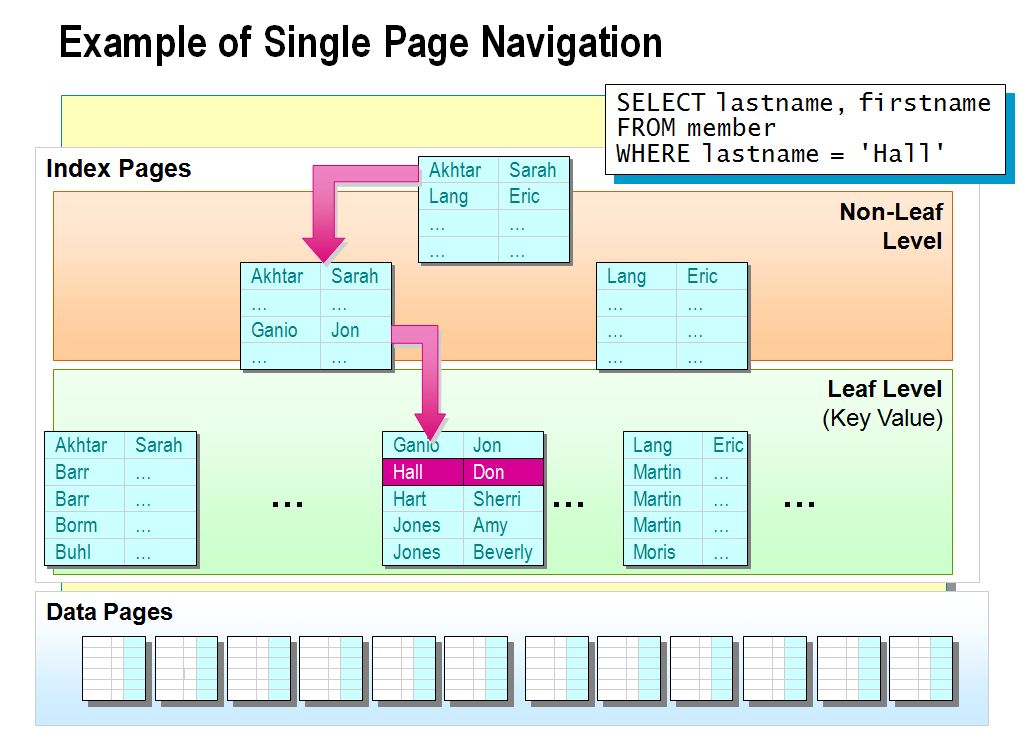
A seek is an efficient access method that can be fulfilled using an index structure.
Seeking touches fewer pages than scanning,
and can only occur on an index of some type.
Think of a seek as what you would do with a phone book
if I told you to find the phone number of someone
with last name and the first name.
* Scan
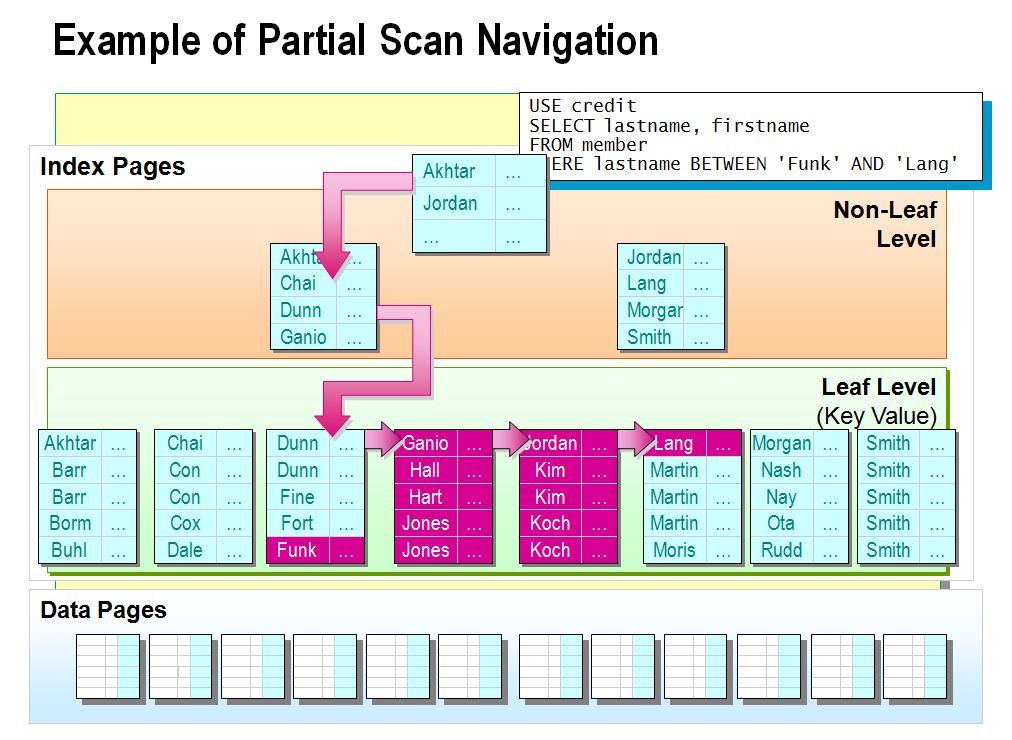
A scan is basically an access method whereby all data, or some range of data,
in an index or heap must be touched or retrieved in order to fulfill a request.
Think of a scan as what you would do with a phone book
if I told you to find the phone numbers for everyone in the book,
or the phone number for all people with the first name,
or for someone with a phone number of (555) 555-5555...
A seek is an efficient access method that can be fulfilled using an index structure.
Seeking touches fewer pages than scanning,
and can only occur on an index of some type.
Think of a seek as what you would do with a phone book
if I told you to find the phone number of someone
with last name and the first name.
* Scan
A scan is basically an access method whereby all data, or some range of data,
in an index or heap must be touched or retrieved in order to fulfill a request.
Think of a scan as what you would do with a phone book
if I told you to find the phone numbers for everyone in the book,
or the phone number for all people with the first name,
or for someone with a phone number of (555) 555-5555...
What is B-Tree in SQL Server ?
A B-Tree (balanced-tree) is a balanced, structured object,
and it is used for all indexes in Sql Server (Clustered, Nonclustered, XML, etc.).
Think of a B-Tree as a triangle-shaped structure of pages -
* it has a single root page at the top of the triangle
with pointers to the next level down the triangle
(which is wider than the root level by the number of pages
that the root page can contain pointers to),
* each of those pages contain pointers to the next level,
and so on (these are called intermediate pages) down the triangle
until you get to the bottom of the triangle,
which is the widest and referred to as the 'leaf' level of the structure.
In ASCII x marks, a B-tree would look like the following
if it contained 2 intermediate levels
where each page in the root and intermediate levels could each could point to 3 other pages:
and it is used for all indexes in Sql Server (Clustered, Nonclustered, XML, etc.).
Think of a B-Tree as a triangle-shaped structure of pages -
* it has a single root page at the top of the triangle
with pointers to the next level down the triangle
(which is wider than the root level by the number of pages
that the root page can contain pointers to),
* each of those pages contain pointers to the next level,
and so on (these are called intermediate pages) down the triangle
until you get to the bottom of the triangle,
which is the widest and referred to as the 'leaf' level of the structure.
In ASCII x marks, a B-tree would look like the following
if it contained 2 intermediate levels
where each page in the root and intermediate levels could each could point to 3 other pages:
What is Heap in SQL Server ?
A heap is basically a bunch of pages with no particular structure
(aside from that of a page/extent), no order, no linkage.
If you have a table that has no Clustered Index defined on it,
then the data for that table is stored in a heap.
Heaps are logically a flat structure
(i.e. they are made up of only data pages, no root/intermediate pages).
Given that there is no order, structure, or page linkage in a heap,
there is no direct support in a heap for singleton lookups or range scans.
Source:
http://www.mssqltips.com/sqlservertip/2261/sql-server-fragmentation-storage-basics-and-access-methods-part-1-of-9/
(aside from that of a page/extent), no order, no linkage.
If you have a table that has no Clustered Index defined on it,
then the data for that table is stored in a heap.
Heaps are logically a flat structure
(i.e. they are made up of only data pages, no root/intermediate pages).
Given that there is no order, structure, or page linkage in a heap,
there is no direct support in a heap for singleton lookups or range scans.
Source:
http://www.mssqltips.com/sqlservertip/2261/sql-server-fragmentation-storage-basics-and-access-methods-part-1-of-9/
What is HoBT in SQL Server ?
HoBT (pronounced "hobbit") stands for "Heap or B-Tree"
and is the logical name for how all user data is stored in Sql Server (either in a heap or a B-tree).
Source:
http://www.mssqltips.com/sqlservertip/2261/sql-server-fragmentation-storage-basics-and-access-methods-part-1-of-9/
and is the logical name for how all user data is stored in Sql Server (either in a heap or a B-tree).
Source:
http://www.mssqltips.com/sqlservertip/2261/sql-server-fragmentation-storage-basics-and-access-methods-part-1-of-9/
What is Pages in SQL Server ?
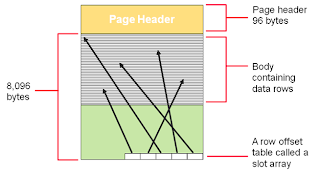
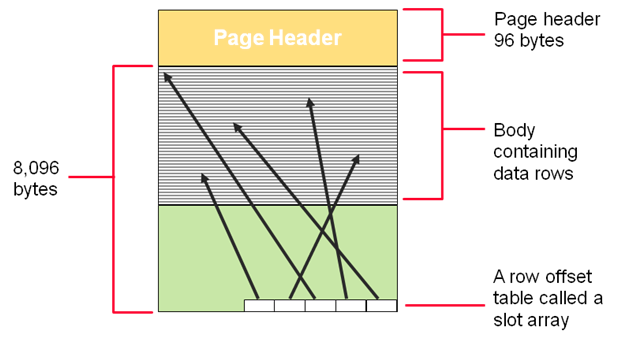
A page in Sql Server is the primary storage structure for all data
(data, indexes, BLOB/CLOB/LOB, row-overflow/SLOB, etc.).
Pages are 8k in size and store records in no particular order
(row offset is used to find each logical record on the page)
- a very basic structure is as follows:
Source:
http://www.mssqltips.com/sqlservertip/2261/sql-server-fragmentation-storage-basics-and-access-methods-part-1-of-9/
(data, indexes, BLOB/CLOB/LOB, row-overflow/SLOB, etc.).
Pages are 8k in size and store records in no particular order
(row offset is used to find each logical record on the page)
- a very basic structure is as follows:
Source:
http://www.mssqltips.com/sqlservertip/2261/sql-server-fragmentation-storage-basics-and-access-methods-part-1-of-9/
17 Juli 2012
SQL Server Database Administrator - DBA Checklist Opportunities for Automation
* Setup alerts for specific error levels or error messages
that impact your SQL Servers in order to be notified automatically.
o Database Backup and Restore Failure Notifications
* Setup Jobs to query for specific conditions in your tables
to validate data was loaded or data is being added to specific tables
based on your business processes throughout the day.
* Setup notification on Job success, failure or completion.
o One word of warning is to check your business critical Jobs
on a regular basis just to be sure they are working properly.
Nothing is worse than finding out a key process has been
failing for days, weeks or months
and the reason notifications have not been sent
are due to an incorrect configuration, full mailbox, etc.
It may be 30 minutes on a weekly basis that is time well spent.
that impact your SQL Servers in order to be notified automatically.
o Database Backup and Restore Failure Notifications
* Setup Jobs to query for specific conditions in your tables
to validate data was loaded or data is being added to specific tables
based on your business processes throughout the day.
* Setup notification on Job success, failure or completion.
o One word of warning is to check your business critical Jobs
on a regular basis just to be sure they are working properly.
Nothing is worse than finding out a key process has been
failing for days, weeks or months
and the reason notifications have not been sent
are due to an incorrect configuration, full mailbox, etc.
It may be 30 minutes on a weekly basis that is time well spent.